ShopDreamUp AI ArtDreamUp
Deviation Actions


Suggested Deviants


Suggested Collections


You Might Like…


![Rect Clock [1.0]](https://images-wixmp-ed30a86b8c4ca887773594c2.wixmp.com/i/d3d516dd-f35f-4f34-9492-10d639d62b6d/d5np7qb-19241b53-7d67-4e04-86ff-16269aaa6785.png/v1/crop/w_184,h_184,x_26,y_0,scl_0.21395348837209,q_70,strp/rect_clock__1_0__by_injust29_d5np7qb-92s-2x.jpg)
![Rect Clock [1.0]](https://images-wixmp-ed30a86b8c4ca887773594c2.wixmp.com/i/d3d516dd-f35f-4f34-9492-10d639d62b6d/d5np7qb-19241b53-7d67-4e04-86ff-16269aaa6785.png/v1/crop/w_92,h_92,x_13,y_0,scl_0.10697674418605,q_70,strp/rect_clock__1_0__by_injust29_d5np7qb-92s.jpg)



Description
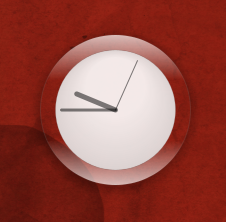
This is a Lua script written with Cairo bindings, to draw an analog clock directly to your Conky window. It is inspired by the Air clock from KDE 4.3. This script is designed for use with Conky 1.7.2+.
You can customise the size and placement of the clock, as well as the size & offset of the drop shadow, and whether you show the seconds hand. All instructions for calling the script from Conky are included in the script.
This .tar.gz package includes a full screenshot, closeup shot of the clock (as in the preview picture), the clock.lua script and a copy of the widget code block, if you want to use this as a Conky widget with my widgets script.
Changelog:
+ v1.0 -- Original release (30.10.2009)
You can customise the size and placement of the clock, as well as the size & offset of the drop shadow, and whether you show the seconds hand. All instructions for calling the script from Conky are included in the script.
This .tar.gz package includes a full screenshot, closeup shot of the clock (as in the preview picture), the clock.lua script and a copy of the widget code block, if you want to use this as a Conky widget with my widgets script.
Changelog:
+ v1.0 -- Original release (30.10.2009)
Comments6
Join the community to add your comment. Already a deviant? Log In
I have everything customized just the way I want it, EXCEPT, of course, the thing that's most important to me.... I want a transparent clock face. In clock.lua, under "--Set clock face", nothing changes from the white background, no matter which values I alter. What am I missing? (It's driving me *nuts*!  )
)
)